

How to test email without sending it to real customers
Route staging email to Capture SMTP, require TLS, and inspect synthetic messages. Includes a tested JavaScript example and checks for accidental delivery.

A staging signup should exercise your email code without putting a password reset in a customer's inbox. Route the staging app's SMTP traffic to a capture server, use synthetic recipients, and check the stored message after a real application action.
Changing the visible To address alone is a fragile safeguard. A background worker can keep an old transport configuration, a message can include Bcc recipients, or a provider SDK can bypass SMTP altogether. The useful question is: which sending path will this process actually use?
Give staging a destination that stops at capture
InboxSpec's Capture SMTP accepts authenticated submissions and stores them in the credential's project. Its capture ingestion path has no SMTP forwarding step to the addressed recipient. The Capture SMTP guide covers creating a credential and finding the connection settings.
That boundary applies to mail submitted through capture. It does not reconfigure your app's other transports, stop a scheduled job using production credentials, or block an unrelated HTTP email API.
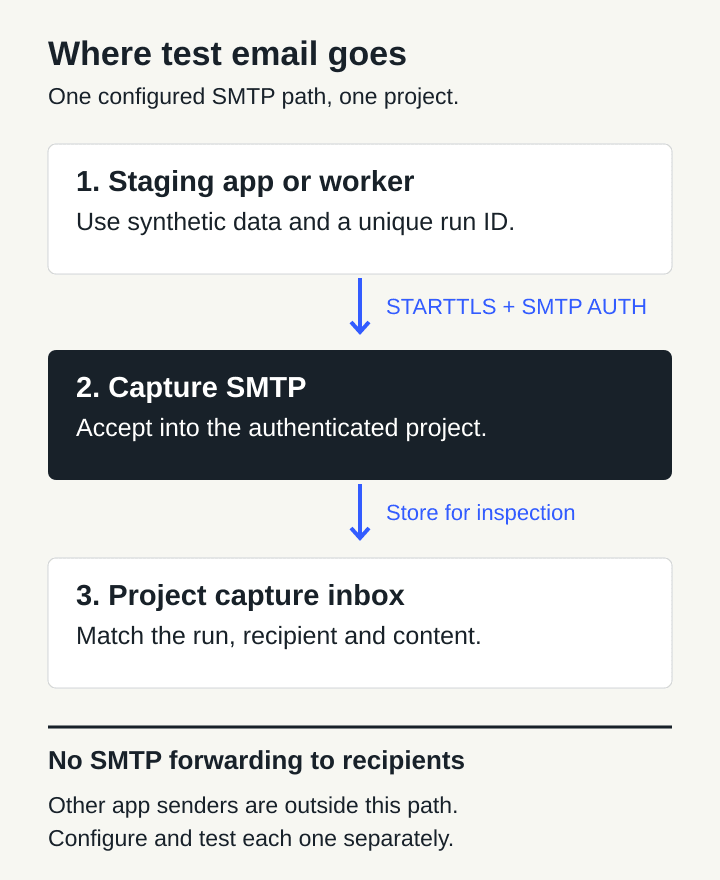
The capture path ends at a project inbox. Each app process that sends mail must be configured to use that path.
The three steps are straightforward: the staging app submits a synthetic email, Capture SMTP associates it with the authenticated project, and your test inspects the captured recipient and content. Use a dedicated project for the environment or test suite so unrelated runs don't share the same inspection space.
Make the SMTP configuration explicit
This example targets InboxSpec on port 587. It uses Nodemailer 10.0.9 and was executed on Bun 1.4.2. Install the pinned dependency in a scratch directory:
mkdir capture-check
cd capture-check
npm init -y
npm install --save-exact nodemailer@10.0.9
Create a project Capture SMTP credential in the console. Put MAIL_MODE=capture, SMTP_HOST=capture.inboxspec.com, SMTP_USER and SMTP_PASSWORD in an ignored .env.capture file. The last two values come from that capture credential, not your console login or a mail-project API key. Keep the file readable only by its owner and out of version control.
Save the following as example.mjs:
import { randomUUID } from "node:crypto";
import { pathToFileURL } from "node:url";
import nodemailer from "nodemailer";

export function captureOptions(env) {
  if (env.MAIL_MODE !== "capture") throw new Error("Capture mode is required");
  if (env.SMTP_HOST !== "capture.inboxspec.com") {
    throw new Error("Unexpected capture host");
  }
  if (!env.SMTP_USER || !env.SMTP_PASSWORD) {
    throw new Error("Capture credentials are missing");
  }
  return {
    host: env.SMTP_HOST,
    port: 587,
    secure: false,
    requireTLS: true,
    auth: { user: env.SMTP_USER, pass: env.SMTP_PASSWORD },
    connectionTimeout: 10_000,
    greetingTimeout: 10_000,
    socketTimeout: 20_000,
    disableFileAccess: true,
    disableUrlAccess: true,
  };
}

export async function sendProbe(transport) {
  const runId = randomUUID();
  const recipient = `signup-${runId}@example.invalid`;
  await transport.verify();
  const result = await transport.sendMail({
    from: "staging@example.invalid",
    to: recipient,
    subject: `Capture smoke test ${runId}`,
    text: `Synthetic signup email for run ${runId}.`,
  });
  if (!result.accepted.includes(recipient) || result.rejected.length !== 0) {
    throw new Error("The capture recipient was not accepted");
  }
  return { runId, recipient, messageId: result.messageId };
}

if (process.argv[1] && import.meta.url === pathToFileURL(process.argv[1]).href) {
  const transport = nodemailer.createTransport(captureOptions(process.env));
  try {
    const { runId } = await sendProbe(transport);
    console.log(`Accepted by capture. Find run ${runId} in the project inboxes.`);
  } finally {
    transport.close();
  }
}
Run it with the credential file loaded into the process:
bun --env-file=.env.capture example.mjs
The expected output starts with Accepted by capture and includes a unique run ID. It means the SMTP submission was accepted. The next check is finding the corresponding stored message.
The host check catches an accidental destination change before a connection opens. For a different approved deployment, update that constant deliberately. It is a configuration guard, not a network restriction: code elsewhere can still create another transport. There is no production fallback in this example. Missing settings or a refused submission fail the run.
On port 587, Nodemailer's secure: false starts an SMTP connection that can upgrade using STARTTLS. requireTLS: true makes a missing or failed upgrade an error. Leave certificate verification enabled. These settings protect the connection to the capture server; they do not prove where the application sent some other email. See the SMTP transport options.
The unique recipient uses .invalid, a reserved top-level domain described in RFC 2606. That keeps the fixture distinct from a customer's address. It is an extra precaution, not a substitute for controlling the sending path.
Inspect the envelope and the message
Open the credential's project, find the capture inbox for the generated recipient, and match the run ID in the subject and body. Check these separately:
- Destination: the SMTP envelope contains the synthetic recipient you intended.
- Content: the subject, plain text, HTML and any attachment match this test case.
- Application links: reset and verification links point to your staging application.
- Correlation: this is the current run's message, not an older capture with a similar subject.
SMTP routing uses the envelope. Visible headers are a separate representation: Nodemailer normally builds the envelope from To, Cc and Bcc, but an explicit envelope option can override it. Looking only at a rendered To header can miss a recipient. The SMTP envelope reference explains that distinction.
transport.verify() checks the connection and authentication without submitting a message. A successful result is useful setup evidence, but it doesn't establish that your template was sent or stored. The example therefore sends a real synthetic message after verification. Nodemailer's verification documentation describes what that method covers.
InboxSpec capture inboxes are separate from registered MX test inboxes. Pointing your app at Capture SMTP will not populate an inbox created for an MX delivery test. Choose the corresponding capture inbox when reading or waiting. Once the transport is correct, testing an OTP flow without flaky polling covers message matching and completing the browser action.
Check the senders that are easy to forget
Use the smoke test to validate the transport, then trigger the same signup, invoice or notification path that your application actually runs. A standalone script doesn't prove that the web process and its workers use the same settings.
Review queue workers, scheduled jobs, retry handlers and older preview deployments. Restart or redeploy processes that retain configuration in memory. Keep production sending credentials out of staging, including credentials for provider SDKs that never use SMTP. Where your environment supports it, restrict outbound access to the approved destinations as another layer of protection.
Exercise a failure too. With an invalid capture password, the operation should fail without submitting a message through a second transport. If your wrapper catches that error and tries a production provider, fix that behavior before running broad staging jobs. Cover To, Cc, Bcc and any explicit envelope in tests of your actual mail-building code; this single-recipient probe does not cover those application branches.
Know what capture can and cannot establish
Capture is useful for checking that your application generated and submitted the intended email, including its recipient, body and attachments. It does not demonstrate delivery to an external mailbox, placement in an inbox rather than spam, or appearance in every email client. Those need separate, authorized tests against mailboxes you control.
Use synthetic names and content as well as synthetic addresses. Captured mail is still stored data, and a link or remote image inside it may refer to another system. Keep production tokens, customer exports and live tracking URLs out of test fixtures. After inspection, remove test messages or dedicated test inboxes according to your cleanup policy, and revoke short-lived test credentials when they're no longer needed.
For this article, the example ran against a local instance of the repository's real capture listener and ingestion pipeline, backed by PostgreSQL. Checks covered TLS-authenticated submission, stored-message and API readback, configuration rejection, invalid authentication, and refusal when STARTTLS was unavailable. Verification alone stored no message. The harness used a trusted local test certificate and cleaned up its test tenant and files.
That is local integration evidence, not a fresh test of hosted SMTP or of your app's production transport. Start with the capture setup guide, then run one real staging workflow and inspect the message that workflow produced.