

How to test email OTP flows without flaky polling
Test email OTP flows with isolated test inboxes, a bounded wait and explicit code validation. Includes TypeScript examples, timeout handling and cleanup.
Your signup test clicks Send code, waits five seconds, then opens an inbox. It passes on your laptop. In CI, the email sometimes arrives after the check. Another run finds an old code and fails somewhere less obvious.
The useful change is to give each test attempt its own inbox and wait for the message that belongs to it. Set a deadline, validate the extracted code, and assert that the application actually signs the user in.
That removes the fixed sleep and the client-side inbox polling loop. It does not make email delivery infallible. It gives your test a clearer way to succeed or explain why it stopped.
The flow we're testing
This example assumes an application that emails a six-digit code with a subject containing Your verification code. Adjust both expectations to your own template.
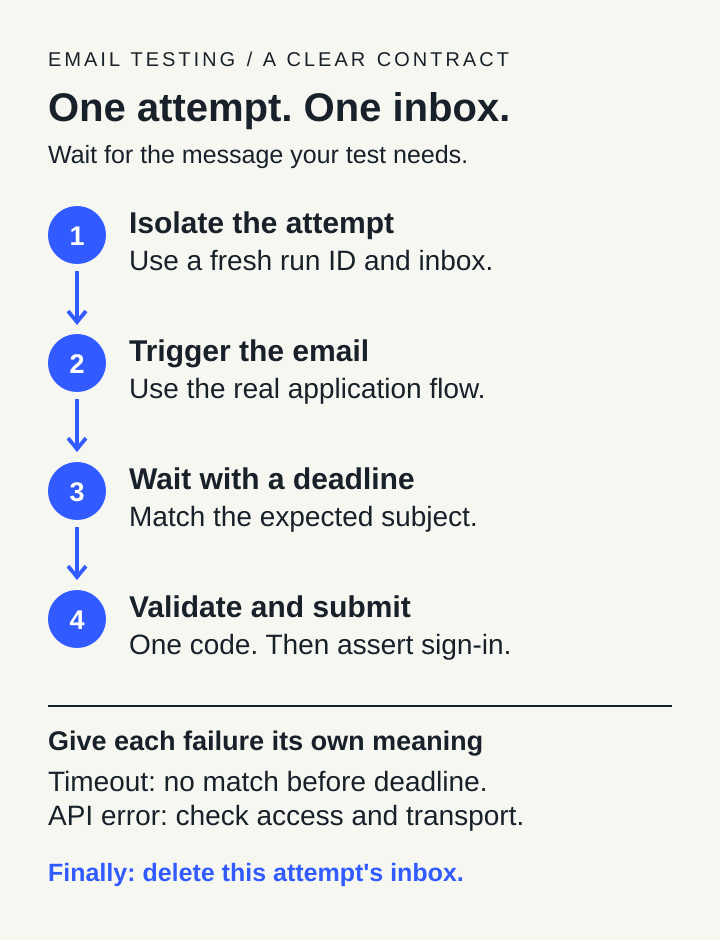
One attempt owns one inbox. A matching message, a timeout and an API error lead to different decisions.
The sequence is:
- Create a fresh run identifier and its inbox.
- Ask your application to send a code to that address.
- Wait for the expected email, with a finite deadline.
- Require exactly one plausible code, submit it, and check the signed-in state.
- Delete that attempt's inbox even if the test fails.
Keep using your application's actual send path. Substituting a fabricated email can test extraction, but it cannot tell you whether signup sent anything.
Keep retries from sharing old mail
A deterministic run inbox is useful when multiple steps need to recover the same address. In InboxSpec, inboxes.forRun({ run_id }) provides that behavior. Reusing the run ID also means reusing the inbox identity.
For an independent signup attempt, generate the ID once with randomUUID() and pass the resulting address through the flow. Generate a new ID when the runner retries the whole test. Do not use only a branch name or a test title: concurrent runs can share those values.
If your workflow spans separate processes, persist the attempt ID instead of generating a different one in each step. Isolation means one identity per attempt, not one identity per function call.
This example uses a fresh inbox, so it does not need a laptop-clock timestamp to exclude earlier messages. Its subject filter narrows the expected message. If the application can emit several similar messages in the same attempt, add a more precise discriminator, such as the documented correlation header. A subject substring alone does not distinguish two resend attempts or authenticate the sender.
Implement the wait once
The helper below uses the current InboxSpec TypeScript SDK contract. It needs a configured InboxSpec client, a project key with the required inbox/message permissions, and three application-specific functions. Start with the first-email guide for environment setup.
The SDK is currently distributed through the project's private client release. This article does not assume a public npm package is available. Use your approved installation source and the API origin for the environment you are testing.
requestCode must trigger the application's email flow. submitCode enters the received code. assertSignedIn checks the resulting authenticated state. The helper awaits all three.
import { randomUUID } from "node:crypto";
import type { InboxSpec } from "@inboxspec/sdk";

export async function testEmailOtp(
  client: InboxSpec,
  app: {
    requestCode: (email: string) => Promise<void>;
    submitCode: (code: string) => Promise<void>;
    assertSignedIn: () => Promise<void>;
  },
) {
  const inbox = await client.inboxes.forRun({
    run_id: `otp-${randomUUID()}`,
    retention_seconds: 3600,
  });
  const failures: unknown[] = [];
  try {
    await app.requestCode(inbox.address);
    const result = await client.messages.wait({
      inbox: inbox.id,
      match: { subject_contains: "Your verification code" },
      timeout_ms: 20_000,
    });
    if (result.status === "timeout") {
      throw new Error(`OTP wait timed out; non-matching arrivals: ${result.non_matching_arrivals}`);
    }
    const candidates = [...new Set(result.message.codes)].filter((code) => /^\d{6}$/.test(code));
    if (candidates.length !== 1) {
      throw new Error(`Expected one six-digit OTP, found ${candidates.length}`);
    }
    await app.submitCode(candidates[0]!);
    await app.assertSignedIn();
  } catch (error) {
    failures.push(error);
  } finally {
    try {
      await client.inboxes.delete(inbox.id);
    } catch (error) {
      failures.push(error);
    }
  }
  if (failures.length === 1) throw failures[0];
  if (failures.length > 1) throw new AggregateError(failures, "OTP test and cleanup failed");
}
The finally block deletes the specific inbox created by this invocation. It does not clear a shared project. The helper preserves both errors if the test and cleanup fail, so cleanup cannot hide the original failure. Set a retention period your project permits; the one-hour value above is an example, not an entitlement guarantee. Inbox cleanup also does not remove a test user created inside your application. Give that user its own cleanup in your test fixture.
Don't accept the first number you find
InboxSpec returns extracted code candidates. Those candidates are useful input to your test, not a guarantee that every number is the OTP your form expects.
The helper keeps distinct candidates that match exactly six digits. Zero candidates fails immediately. Two candidates also fails immediately, instead of guessing that the first one is right.
That is deliberately strict. A template containing both a six-digit reference number and a six-digit OTP may need a better template-specific rule using extraction context. For an alphanumeric or differently sized code, change the validation to match your application. Keep the value as a string so leading zeroes survive.
The wait does not filter on has_code. That lets an email with the expected subject but no usable code reach validation and fail as a template/extraction problem. Otherwise, it could appear only as a wait timeout.
Give the test enough time to report the right failure
The example gives the email wait 20 seconds. That is a starting budget, not a delivery promise. Choose your actual deadline from the behavior you expect and observe.
A server-side wait can return when a message already stored in the inbox matches, or when a matching message becomes available during the wait. You do not need to keep requesting the inbox list after triggering the email. The current SDK also gives wait requests transport headroom beyond the requested server wait.
Your test runner still has its own deadline. For Playwright, set a whole-test budget that covers setup, the email wait, form submission, assertions and cleanup. Its timeout documentation explains these separate budgets. A 20-second email wait inside a nearly exhausted test will not get its full budget.
Use Playwright's awaited, retrying assertions for the final browser state, for example checking that a known signed-in heading becomes visible. Those assertions observe the page until the expectation succeeds or their deadline expires. They do not confirm email delivery on their own. See the assertion guidance.
Read failures as evidence
| Outcome | What it establishes | What to inspect next |
|---|---|---|
| Matching email, one valid candidate, sign-in assertion passes | This attempt completed the tested flow | Keep the run's success evidence without logging the OTP |
| Wait timeout | No matching email was returned within the deadline | Recipient, send path, queue/delivery status and filter |
| Non-matching arrivals during the wait | Messages arrived during the wait but missed the predicate | Expected subject and other matching rules |
| Matching email, zero or several candidates | The message matched, but code selection was ambiguous or empty | Template, extraction context and expected code format |
| API or transport error | The request could not complete normally | Authentication, permissions, allowance, service or network |
| Code submitted, sign-in assertion fails | Receiving a code did not complete authentication | Expiry, resend invalidation, form behavior and application response |
A timeout does not prove the application never sent an email. An API error should not be converted into an empty mailbox. Keep run IDs and request IDs for diagnosis, but avoid writing OTPs, authorization headers or full message bodies into CI logs.
What this example has actually been checked against
The helper was executed with the repository SDK on Bun 1.4.2 using isolated HTTP response fixtures. Five checks covered success, timeout, missing codes, ambiguous codes, and preserving an API error alongside a cleanup failure. The repository's SDK and wait-contract tests also passed.
Those checks establish the helper's control flow and the SDK calls it makes. They are not a live SMTP or browser signup test. Wire the three application functions to your own test app and run the complete journey before relying on it in CI. Test isolation should extend to application accounts and browser state as well as the inbox; Playwright's best-practice guidance covers that broader setup.
A well-written polling loop can still work when your provider offers no blocking wait. It needs a deadline, a reliable message filter and sensible retry behavior. When a server-side wait is available, use it to remove that repeated client work while keeping the same explicit success criteria.
The test should pass because this attempt received the expected email and completed sign-in. Start with the first-email setup, then adapt the helper to your application's template and authenticated state.