

Your email API returned 200. Did the message arrive?
Separate a successful send request from email arrival. Follow a tested failure reproduction and add correlated inbox assertions to your developer workflow.

Your email API returned 200, but the test inbox is empty. Keep the successful response as evidence that the request completed. Then check the separate outcome you actually need: a message for this attempt arrived at the intended destination.
A test that stops at response.ok can pass while a later delivery step never runs. The fix is to connect the send request to a receiving-side assertion with a unique correlation value and a deadline.
A passing request and a failing email test
For this article, we built a local reproduction with a deliberately broken send endpoint. It returns HTTP 200 and a request ID, but skips SMTP submission. Nothing is sent. This is an injected fault, not a customer incident or a claim about a particular email provider.
We ran the same arrival check against four behaviors:
| Local endpoint behavior | Send response | Receiving-side result |
|---|---|---|
| Skip SMTP submission | 200 | No matching arrival before the deadline |
| Submit the expected message | 200 | Matching message found |
| Submit with a different correlation value | 200 | Message stored, but no matching arrival |
| Reject the request | 503 | Send failure, before the wait |
Checking only the HTTP status would miss both broken 200 cases. The second broken case matters: finding some mail is not sufficient evidence for this send attempt.
The successful and wrong-correlation cases used a real local SMTP listener, ingestion pipeline, PostgreSQL storage and the InboxSpec SDK's wait operation. The dropped case never opened an SMTP connection. The fixture used synthetic mail and removed its test inboxes and tenant afterward. It did not exercise a public provider, DNS delivery, hosted SMTP or a customer's mailbox.
Name the checkpoint before calling it delivered
HTTP 200 means the request succeeded; the method and endpoint contract determine what that success represents. HTTP 202 explicitly means processing has been accepted but is not complete. Neither status, by itself, defines an email delivery guarantee. Read your endpoint's response body and documented semantics. RFC 9110's successful response definitions establish that distinction.
SMTP has another checkpoint. A positive response after the end of message data transfers responsibility to the accepting server. A 250 response to an earlier command is not that final handoff. See RFC 5321's completion of DATA. An intermediate relay accepting responsibility still does not establish placement in the final mailbox's inbox folder.
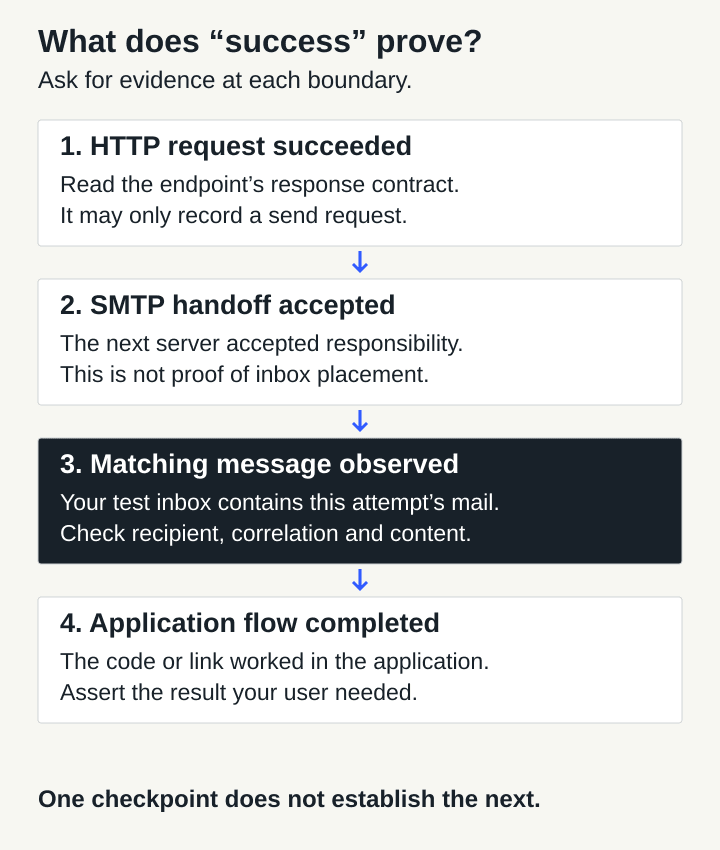
Choose the checkpoint your test needs, then observe it directly.
For a receiving test, that means finding the expected message in the expected test inbox. For a password reset test, continue through the link and assert that the password actually changed. Receipt, usable content and application completion are separate assertions.
If your sender reports a “delivered” event, read that provider's definition before treating it as evidence of inbox placement or human attention. A status name is not a universal contract.
Carry one attempt identifier across the boundary
Keep these identifiers separate in your diagnostic record:
- Attempt correlation: a value you create and pass through the application into the email.
- Provider request ID: the sender's reference for its API operation, if exposed.
- RFC Message-ID: the email header value, which may be absent or represented differently by a parser.
- Stored message ID: the receiving system's identifier for the captured message.
Do not put a provider request ID into an RFC Message-ID filter unless the provider explicitly documents that relationship. In our fixture they are different values.
InboxSpec's correlation_id matcher checks the X-InboxSpec-Correlation-ID email header with exact, case-sensitive matching. Your application adapter must set that header; adding a field to an HTTP request does not automatically create an email header. The message wait guide explains the receiving contract.
Use a fresh inbox for each independent attempt. If the sender cannot preserve a custom header, choose a supported discriminator, such as a unique subject token, and test that it survives the send path. A correlation value distinguishes attempts; it does not authenticate the sender.
Assert arrival after the send response
This helper takes an existing isolated inbox and a configured InboxSpec SDK client. The send adapter must invoke your application's real mail flow, preserve the correlation header and return its actual HTTP status and provider request ID. If the provider exposes no ID, use an explicit marker such as not-exposed, rather than inventing a provider receipt.
The code was exercised on Bun 1.4.2 with the repository SDK at revision 0193145. Use your approved SDK installation source; this article does not assume a public npm package is available. The first-email guide covers client and inbox setup.
import { randomUUID } from "node:crypto";
import type { InboxSpec } from "@inboxspec/sdk";

export async function verifyArrival(
  client: InboxSpec,
  inbox: { id: string; address: string },
  send: (
    to: string,
    correlationId: string,
  ) => Promise<{
    httpStatus: number;
    providerRequestId: string;
  }>,
  timeoutMs = 20_000,
) {
  const correlationId = randomUUID();
  const requestedAt = new Date().toISOString();
  const receipt = await send(inbox.address, correlationId);
  if (receipt.httpStatus < 200 || receipt.httpStatus >= 300) {
    throw new Error(`Send request failed: HTTP ${receipt.httpStatus}`);
  }
  const outcome = await client.messages.wait({
    inbox: inbox.id,
    match: { correlation_id: correlationId },
    timeout_ms: timeoutMs,
  });
  if (outcome.status === "timeout") {
    throw new Error(
      `No matching arrival within ${timeoutMs} ms; ` +
        `send HTTP=${receipt.httpStatus}; request=${receipt.providerRequestId}; ` +
        `correlation=${correlationId}; inbox=${inbox.id}`,
    );
  }
  return {
    providerRequestId: receipt.providerRequestId,
    correlationId,
    requestedAt,
    receivedAt: outcome.message.received_at,
    storedMessageId: outcome.message.id,
    rfcMessageId: outcome.message.message_id,
  };
}
A successful call returns a receipt containing the request reference, correlation value, received timestamp and receiving-system message ID. A no-match result throws an error that preserves the request and inbox references. Authentication failures, missing inboxes and other SDK errors propagate as errors; they are not converted into “email never arrived.”
The default deadline is 20 seconds for the receiving wait after the send adapter resolves. It is not a delivery promise or a deadline for the whole helper. Give the send adapter its own request timeout and configure the test runner's overall deadline accordingly. The reproduction used a shorter 250 ms receiving window with mail either already stored or deliberately omitted. That setting is a fixture choice, not a recommended delivery budget.
Create the inbox before calling the helper, and delete that specific inbox in your test's cleanup path. Preserve the original assertion failure if cleanup also fails. Store only the diagnostic fields you need in access-controlled test artifacts; do not dump message bodies, credentials or reset links into CI logs.
Find the first boundary with missing evidence
Start with one attempt, not a dashboard's total sent count. Match its destination, environment, request reference and correlation value across the systems you operate.
If the application returned success but has no send-attempt record, inspect its branching logic and background worker. If the sender accepted the request, inspect that request's documented event history and any rejection or deferral details. If the receiving server accepted the message, inspect the expected inbox and the filters used by the test. A wrong inbox or a header that was not preserved can produce a timeout even though mail arrived elsewhere.
Record timestamps with their source. The helper's requestedAt comes from the test runner; receivedAt comes from the receiving service. Comparing them can help investigate ordering, but subtracting clocks on different machines is not automatically a reliable latency measurement. Preserve sender event time and event-receipt time separately when both exist.
A timeout means the requested match was not observed within that wait's window. It does not prove permanent loss, identify the failed hop or establish that retrying the send is safe. Check the existing request and the sender's idempotency contract before resubmitting. A delayed original plus a new send can produce two messages.
For email-dependent application tests, finish with the behavior the user needed. The OTP flow walkthrough continues from a matched message to code validation and the application's signed-in state.